
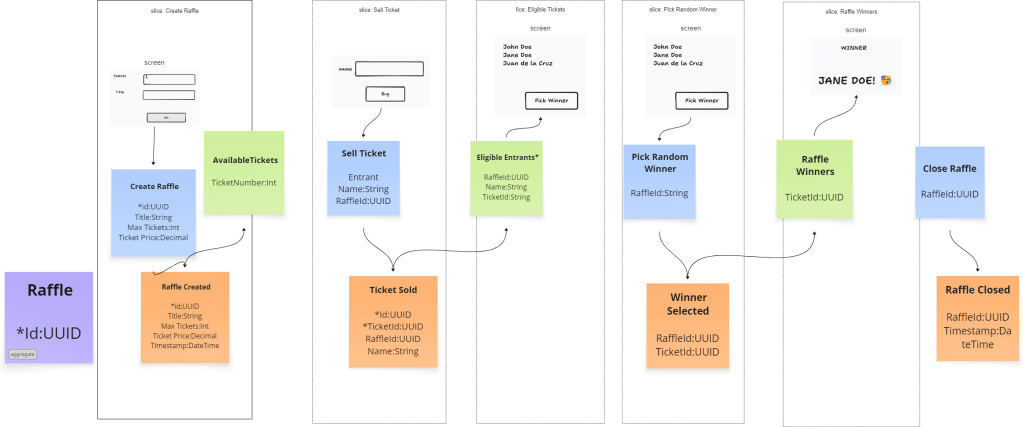
A few weeks ago, I wanted to try out the process of event modeling for designing and then building a simple application. I had picked a simplified raffle application and ended up drawing out the following features:
- ✅Create a raffle
- ⏹️View available tickets
- ✅Sell ticket
- ⏹️View entrants
- ✅Pick Random winner
- ⏹️View winners
I had decided to prioritize some over others due to the lack of time. Things got busy in work and life and I had not really gotten around to finishing up the project. Over the weekend I picked it where I left off. I had already finished two.

Because it was structured in vertical slices, it served as an easy reminder of which features I actually wanted to focus on.
I really liked the file naming convention where each feature has a handler file, which contains the implementation of how the feature is handled. Additionally, if it’s a command then there should be a corresponding event created, and if it’s a query should just be by itself.
This convention just makes it easier to see which ones are done and which ones are pending implementation. It also ensures that we are following the command and query separation design pattern.
I was experimenting with having commands just named Command since they are already in the folders and namespaces of the feature. I wondered if it would be difficult to find stuff or make things less discoverable, but I thought it turned out quite nice.
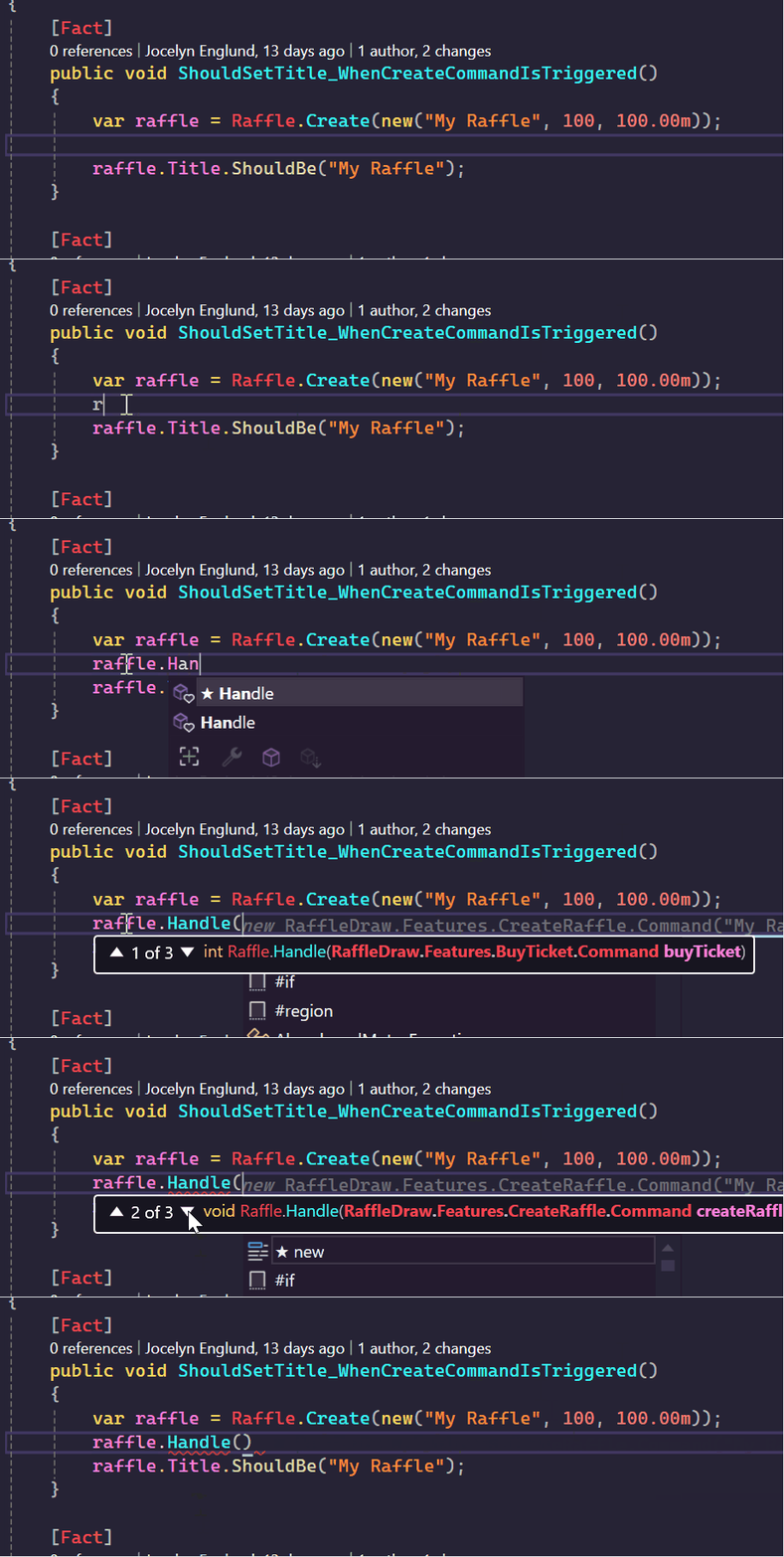
In the example below, if I have a raffle instance, instead of scrolling through differently named methods to figure out what it can do, I can just type handle then I can see which commands are actually supported.
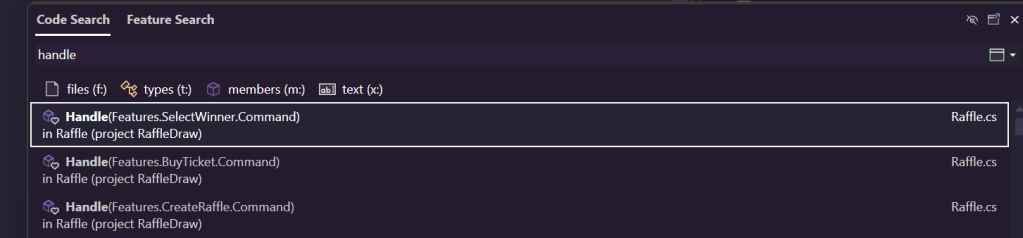
The same goes for doing a code search on Handle in visual Studio, it does a great job of making sure the context of the class is visible.
I didn’t quite go as far as building the front end because design is just not one of my strengths, but I wanted to try out setting up endpoints using Fast Endpoints. Minimal API is pretty straight forward but I found it great for removing even more of the boiler plate code code, especially the swagger stuff 😁

Another really neat thing was the support of http files in visual studio. Instead of having to use postman or even swagger for api testing, using api files make it so much easier to do manual testing. Especially in the rider and vs code variants, they have support for much more. @prompt is one that’s not support in Visual Studio 2022.
@RaffleApi_HostAddress = http://localhost:5041

### Create a raffle
# @name createRaffle
# @prompt title
# @prompt numberOfTickets
# @prompt price
POST {{RaffleApi_HostAddress}}/raffles
Content-Type: application/json

{
  "title": "{{title}}",
  "numberOfTickets": {{numberOfTickets}},
  "price": {{price}}
}
### Get the raffle by ID
@location = {{createRaffle.response.headers.Location}}

###
GET {{RaffleApi_HostAddress}}{{location}}
Accept: application/json

### Buy a ticket
# @name buyTicket
# @prompt HolderName
POST {{RaffleApi_HostAddress}}{{location}}/tickets
Content-type: application/json

{
  "holderName": "{{HolderName}}"
}

### Select winner
# @name selectWinner
POST {{RaffleApi_HostAddress}}{{location}}/winner
Accept: application/json
And the last thing, but certainly not the least, thing i got to try over the weekend was ChatGpt’s, new Codex. I had to give it access to my repository (yes i sold my coding soul to Skynet), and after that, it came up with 3 tasks it could do which I thought was extremely helpful. There was in fact a bug in my code because I had introduced an extension to the buy ticket feature, allowing a buyer to potentially select the ticket number they want (there are folks that really love their lucky numbers after all).
It was the end of the day and we had started watching a show on tv so I set it off to do the tasks and after a few minutes, I had the option to approve some pull requests.

I wanted to see how far it could go so I gave it a next task to suggest the next task (task-ception!).
I had already implemented the select winner logic in my domain model but didn’t get around to finish the rest.
It was quick to suggest that exposing this in a handler and endpoint would be a good next task.


Here is where I think having good structure in the code becomes really helpful. Because I’ve established the structure in my previous features, I can focus on the domain logic and the AI agent can take care of the rest of the layers’ implementation.
I think it’s really exciting times to be in this field. Reflections on these will surely come in a separate post.
But after implementing the key features, this is what my aggregate looks like:

For persistence, I had implemented an in memory repository but now swapped it out with a file based repository, basically having the raffleIds as filenames. This is what the generated file looks like:
[
  {
    "$type": "RaffleCreated",
    "Title": "The great Raffle",
    "NumberOfTickets": 5,
    "Price": 10000,
    "Id": "6b0043ff-37b3-4448-9325-86693beeba47",
    "OccurredOn": "2025-06-15T07:13:42.760379Z"
  },
  {
    "$type": "TicketBought",
    "BuyerName": "George jetsson",
    "RaffleId": "6b0043ff-37b3-4448-9325-86693beeba47",
    "TicketNumber": 1000,
    "OccurredOn": "2025-06-15T07:13:57.4652269Z"
  },
  {
    "$type": "TicketBought",
    "BuyerName": "Fred Flintstone",
    "RaffleId": "6b0043ff-37b3-4448-9325-86693beeba47",
    "TicketNumber": 1001,
    "OccurredOn": "2025-06-15T07:14:08.5624901Z"
  },
  {
    "$type": "TicketBought",
    "BuyerName": "Shaggy",
    "RaffleId": "6b0043ff-37b3-4448-9325-86693beeba47",
    "TicketNumber": 1002,
    "OccurredOn": "2025-06-15T07:14:26.244495Z"
  },
  {
    "$type": "TicketBought",
    "BuyerName": "Scooby",
    "RaffleId": "6b0043ff-37b3-4448-9325-86693beeba47",
    "TicketNumber": 1003,
    "OccurredOn": "2025-06-15T07:14:31.0857066Z"
  },
  {
    "$type": "TicketBought",
    "BuyerName": "Velma",
    "RaffleId": "6b0043ff-37b3-4448-9325-86693beeba47",
    "TicketNumber": 1004,
    "OccurredOn": "2025-06-15T07:14:35.065557Z"
  },
  {
    "$type": "WinnerSelected",
    "TicketNumber": 1004,
    "RaffleID": "6b0043ff-37b3-4448-9325-86693beeba47",
    "OccurredOn": "2025-06-15T07:15:22.1142Z"
  }
]
All in all, I am really liking the event sourcing model. I like how it really frees you from having to decide what properties an aggregate should have right at the get go. Instead, you program the behavior, how you want it to react given a certain sequence of events. It’s perfect for the start of projects when there are still a lot of unknowns. It makes it easy to pivot or adjust things later on.
Let’s say I wanted to update my model with an email address for the buyer, so I can send an email if they’re selected as winners. With event sourcing, there is no need to change any database structure, as long as I set defaults when reading and eventually writing to my event store for the new properties.
Code is here: https://github.com/jocelynenglund/RaffleApp
 being in tech
Leave a comment