I have been reading “Understanding Eventsourcing” by Martin Dilger and got inspired to update my wishlist app to use event sourcing. I managed to do it in a branch but then I stopped because I also wanted to see how feasible it would be to start a project from scratch.
My highschool batch is now preparing for our 25th reunion and I thought of a registration tracker that could be a good, simple app to attempt an event modeling and event sourcing from the start
The book walks through the entire process of event modeling which i thought was great to have an practical example. It even has a sample miro board with event modeling of a shopping cart implementation, not a trivial one too.
I also wanted to try out excalidraw because i think it looks nicer than Miro. So I hit two birds with one stone, I decided to give event modeling this project a shot.
The idea is to have a site that will track a students registration journey from registering interest, to confirming registration and then eventually payment.
I started with the first three events just to try it out. I haven’t really fleshed out the rest of the flow but I thought it was enough to start building some things. This is what the diagram looks like so far.
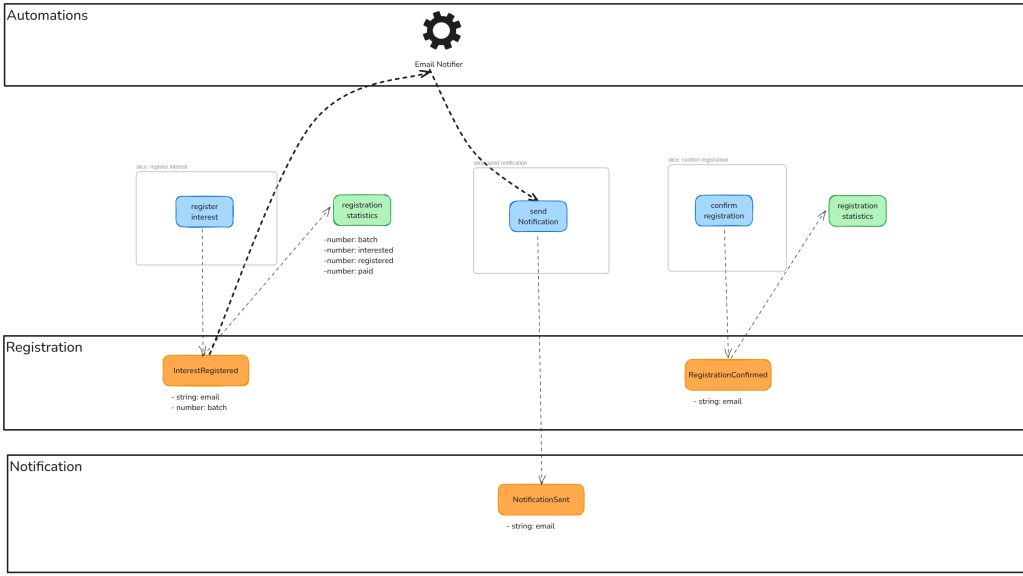
Basically the journey starts when someone visits the site to register their interest in the event. They do that by submitting their email addresses and the batch they belong to. This first slice will be a command that will generate a domain event called InterestRegistered.
We then have a projected read model called registration statistics that is updated when this event is triggered. It summarizes the total numbers of interested students in a batch. This same read model will eventually have the number of confirmed registrations (triggered by confirming their email) and how many have paid (details to be determined in future).
An automation listening to the InterestRegistered triggers a command to the notification service that would send a link to the registered email, asking to confirm their registration. This will be a separate slice, with details also yet to be determined.
When the user finally clicks on the link in the email, that will trigger a new command to confirm email as well as update our registration statistics read model by now incrementing the number of registered students.
I thought the event modeling exercise was a really good way to start thinking of the actual flow things that happen in the application. You simply need to know what information is needed, and that you can derive from what you want to display in the UI, and work backwards to make sure that you have the required information. All you need to know up front is what’s the input, and what’s the output.
I think the tougher is identifying the aggregates but at least you don’t really need to have the exact domain model figured out since you will just be storing the events. For the read models, it’s just straight up storing what you will be displaying to make it as easy as possible to retrieve data without having to do any complex joins or whatever it is.
Actually the book also talks about live projections which makes use of the event store to also generate the read model based on all the events that happened. In my case, I decided to go with a database projection in order to have a go at implementing that already.
The next post will be talking more about building the first slice.

 being in tech
Leave a reply to Trying out TDD, building a registration app – being in tech Cancel reply