
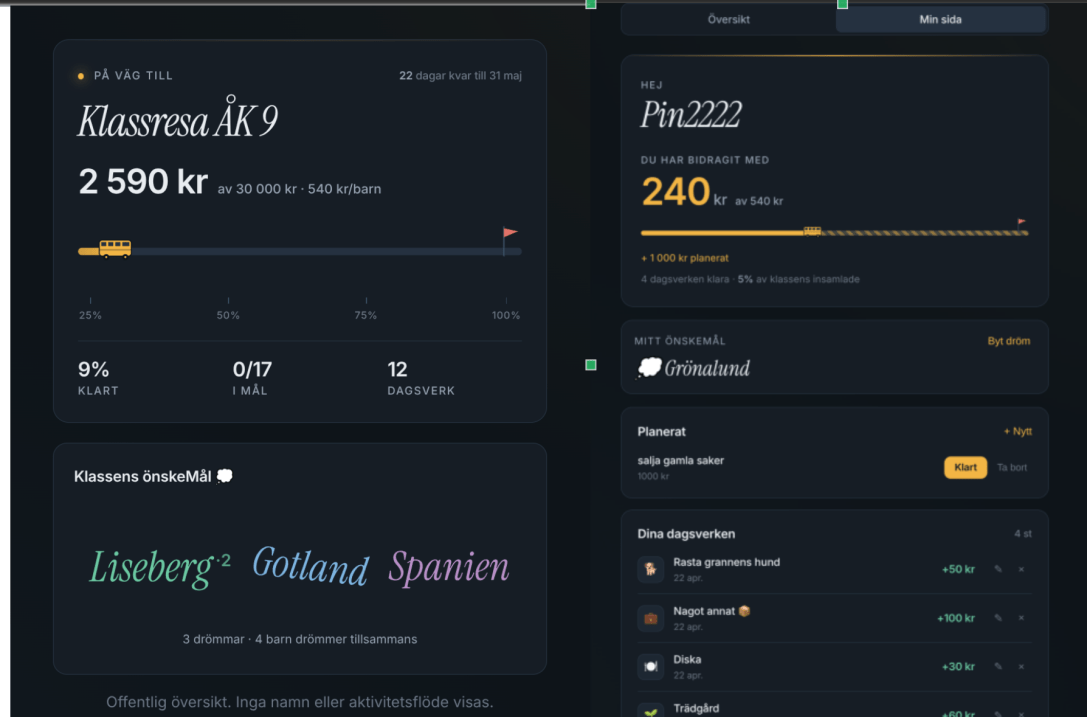
Every term, there’s a set of parents in charge of fundraising activities for the class to save up for a school trip. It can be anything from bake sales to selling stuff like candles, cookies, and many other things.
My son is now 14, and they’re at the age where they probably think it’s not the coolest thing to be knocking on doors selling cookies. What ends up happening is the parents themselves buy the things they’re supposed to sell, or the parents themselves are manning the bake sales.
One parent in the group suggested the idea of Dagsverke. It’s an old Swedish tradition where the word literally means “a day’s work”: kids do chores or odd jobs for family and neighbours, and the money earned goes to a shared cause instead of into their own pockets. Schools have used it for decades as a way to fundraise without just asking people to hand over money.
I thought it was a great idea. For the parents who were just going to Swish the money anyway, now they get an excuse to get their kids to at least help around the house for it.
Of course, I had to build an app for it. I called it Litehjälp (“a little help”). At first I had all these big ideas about having profiles for the kids so they could share with friends and family what ‘skills’ they have, but that quickly became a monster of a project (too many possibilities).
I scaled back and made it simple, basically boiling it down to the minimum viable product: log chores done by students, see how much they add up to the class pot in a visualization that’s easy to understand but can be motivational for the kids to work towards their goal.
At least I thought it was going to be easy. After all, I’d built a similar app in Chore Monkey, what could go wrong?
This was actually the app where I learned quite a lot. All my apps so far had been simple enough to live in a single stream of events that I could read and fold into state on demand. Litehjälp was the first one with multiple streams being read from and written to at once.
One small thing that paid off here: client-generated IDs. Coming from years of letting the database hand out IDs, having the browser do it felt a bit backwards at first. But with multiple parents logging dagsverken from phones on patchy data, every command carrying a UUID the client made means the backend can just dedupe by it. A network hiccup or a double-tap retries safely. No ghost chores.
I’d been using a home-brew file-based event store that saved all events for a stream into a single file, named by the stream ID.
Quick caveat before I go further: I’m not claiming any of this is best practice. I went file-based partly so I could actually see what was happening on disk, partly to save on database costs (I’m cheap), but mostly out of curiosity about how far a file-based solution can be pushed before it falls over.
Because this was going to be used by at least 40 people, I set up some performance tests to see how it held up.
That’s when two problems showed up. The first was on the write side: with multiple parents logging at the same time, writes to the same file were stepping on each other. The fix was making each stream a folder and each event its own file. No more shared file to lock around.
I actually caught this through a load harness I’d built for another app sitting on the same store, a real-time multiplayer game where 30 players can pile into one session at once. With the old single-file store, 13 out of 30 join requests came back as 500s, projection reads failed every single time, and join latency sat at a p50 of 1380 ms. Once I switched to folder-per-stream with a small per-stream semaphore around appends, every error dropped to zero and join p50 dropped to 60 ms. Same store, same fix Litehjälp inherits.
The second was on the read side. Because of the multi-stream nature of the app, a lot of reads had to load and fold events from several streams at once (the class overview, for example, combines every kid’s chores). In Chore Monkey that was never an issue because there was just one stream to read. Here, the way out was making projections as events come in, so reads turn into “open the projection file and serve it.” This was a concept I’d seen before but never really felt the point of. With one stream, you don’t need it. With many, you really do.
To put a concrete number on it: before the projection landed, the children-with-totals endpoint took about 3 seconds for a busy class because it was folding the entire event log on every request. After: 140 ms. About a 20× drop on a single read, just from not redoing work that was already done.
And once projections were doing real work, another payoff of event sourcing started to click. A couple of times along the way I realized a read model was shaped wrong, or wanted to add a new one. No data migration, no SQL ALTER, no scripts to write. Just change the projection code and replay all the events. The events stay the source of truth, and the read models are whatever shape I currently want them to be.
Results of the performance tests were pretty good — at least good enough for my expected number of users.
To put some numbers on it, here’s what I measured against the live backend with a realistic full-class seed:
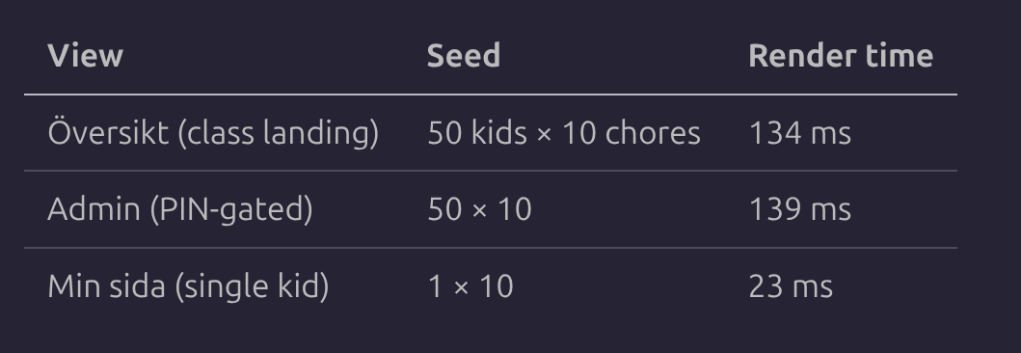
Numbers are medians of 5 reload samples per view. End-to-end Playwright render times (navigation to content visible) against the live Azure backend, with the HTTP connection open and the projection blob on the server in memory from a prior fetch — i.e. the experience of a returning user, not a first-ever visitor. Even with a full class of 50 kids and 500 logged chores, a single kid’s page lands on the floor at 23 ms, and the class views come back in around 135 ms. The store itself is doing its part of all of that in a fraction.
Looking back, this is what I keep coming back to about building stuff yourself. You can read about event sourcing, or idempotent commands, or any of these patterns for years, nod along at the diagrams, and still not really feel why anyone bothers. Then you actually build something, hit the wall the concept was invented for, and the way out turns out to be the concept itself. You don’t just learn it. Sometimes you almost discover it on your own, and that’s when you really understand what it’s for.
Litehjälp is the first app I’ve shipped with more than a handful of real users on it, and so far it’s quietly holding up. Apt name for it, in the end. A little help, going a long way.


